
TechBy Ian I. Salazar
AI-Copilots and Education
Artificial intelligence, or AI, has been a hot topic for the past decade due to the advancement of modern technology, and it paved the way for AI-based solutions to appear out of nowhere, just like the grass in your backyard. One of the ways AI has turned the software engineering industry upside-down was with the introduction of AI-Based Software Development tools, or as they like to call it, AI-Copilots. With the assistance of AI-based solutions like GitHub Copilot, developers now have a tool that can help them while they develop software. Features such as code completion, documentation, and test generation are just a glimpse into the myriad of things that AI-Copilots can do.
But is this the silver bullet solution that programmers have been looking for? In this article, I'll briefly discuss code assistance tools, how AI fits into all of this, my opinion of it as a first-hand user, and the drawbacks of GitHub Copilot.
CODE ASSISTANCE TOOLS
I remember around 7 years ago when I was working on a side project and using Sublime Text / Atom as my text editor. Back then, tools were simpler, as text editors / IDEs provided you with autocomplete features. You start typing a few keywords, wait for a few seconds, and voila! A new class with a constructor is generated for you. But as time went on and I worked on different projects, I realized that most of the software developer tasks that I do (and I’m sure a lot of you can relate to this) follow some kind of pattern. That’s when I looked into snippets, code-generation tools, and code completion tools to help me write code faster. And yes, I had to read and study about clean code, design patterns, and best practices to balance this out (this will come in handy later on in this article).
Fast forward to today, where I’m working as a full time software developer at a consulting company. It's a different landscape when you get to work on a project with a bigger scope. With that, the limitations of snippets / code-gen tools that we know of start to appear. There are times that I need the output of a specific code snippet that I use, but I have to modify a lot of the output just to satisfy my requirements. I had to look for alternative and better tools to help me with my work. That’s when I discovered GitHub Copilot.
THE RISE OF AI-ASSISTED TOOLS
It was October 2021 when GitHub launched GitHub Copilot, a cloud-based AI tool developed by GitHub and OpenAI that assists developers by autocompleting code. After a year, OpenAI released ChatGPT, another AI-based tool that significantly impacted the world upon its release. Auto-complete is a feature known to many modern software programs where the user provides the least amount of input, let’s say a text, and a program tries to predict what the user will input next. This kind of feature is further augmented by artificial intelligence, providing users with the best experience possible. With GitHub Copilot, it suggests or auto-completes code for you (which you’ll see in the following section). Other features, like code comment suggestions, are also on the list. These are all made possible because it’s powered by OpenAI Codex, a new AI system created by OpenAI that is also a descendant of GPT-3, one of the old engines of ChatGPT. GitHub Copilot was trained from dozens of code repositories (or repos) available to the public . With over 28 million public repos stored on GitHub, it’s a no-brainer that Copilot has one of the largest amounts of training data available. With that, let’s see GitHub Copilot in action.
USING GITHUB COPILOT
As of this writing, GitHub Copilot is available to individuals or businesses for a fixed monthly subscription. Luckily for us students, we can get it for free by applying for a GitHub Student Developer Pack. Once you have an upgraded account, open up your text editor (in my case, I use VS Code but Copilot also supports other popular IDEs) and install the GitHub Copilot extension. Once that’s done, make sure you’re signed in using your GitHub Pro account (make sure to read the official guide if you ever feel lost). Once everything has been set up, you can now type away and use Copilot! To get started, I’ve listed three common use cases for Copilot that you can try.
CASE 1: LETTING COPILOT WRITE CODE FOR YOU
Let’s say you want to write a simple function that calculates the factorial of a number and returns it. Simply write a comment detailing what you want, and Copilot will process your comment and generate the code for you.
For example, say you write the following comment in Python:
# A function that calculates the factorial of a number, and re-turns the result as an integer
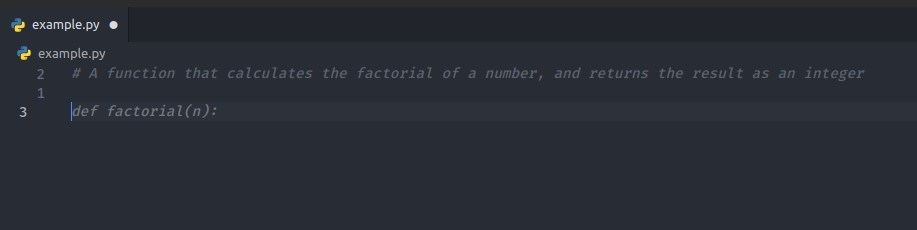
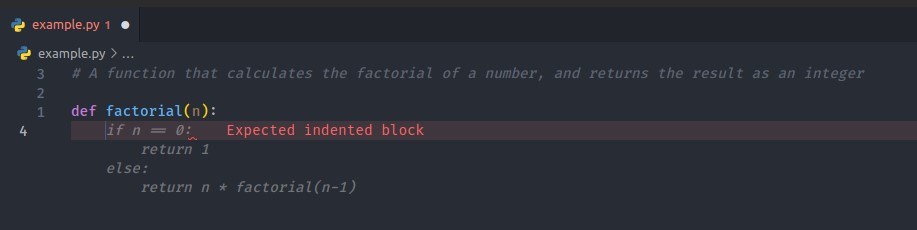
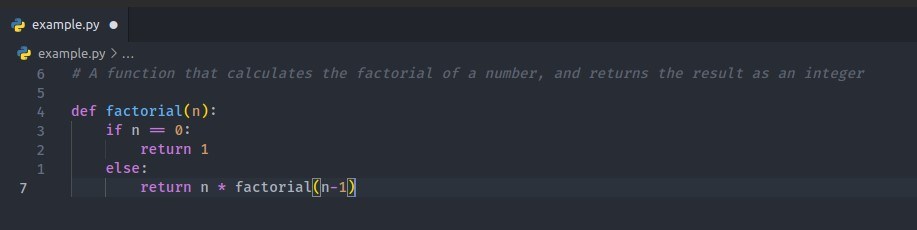
This can be further expanded to more complex requirements, but you get the gist. First, you write some comments to specify what you need from Copilot. Next, let Copilot suggest code snippets for you.
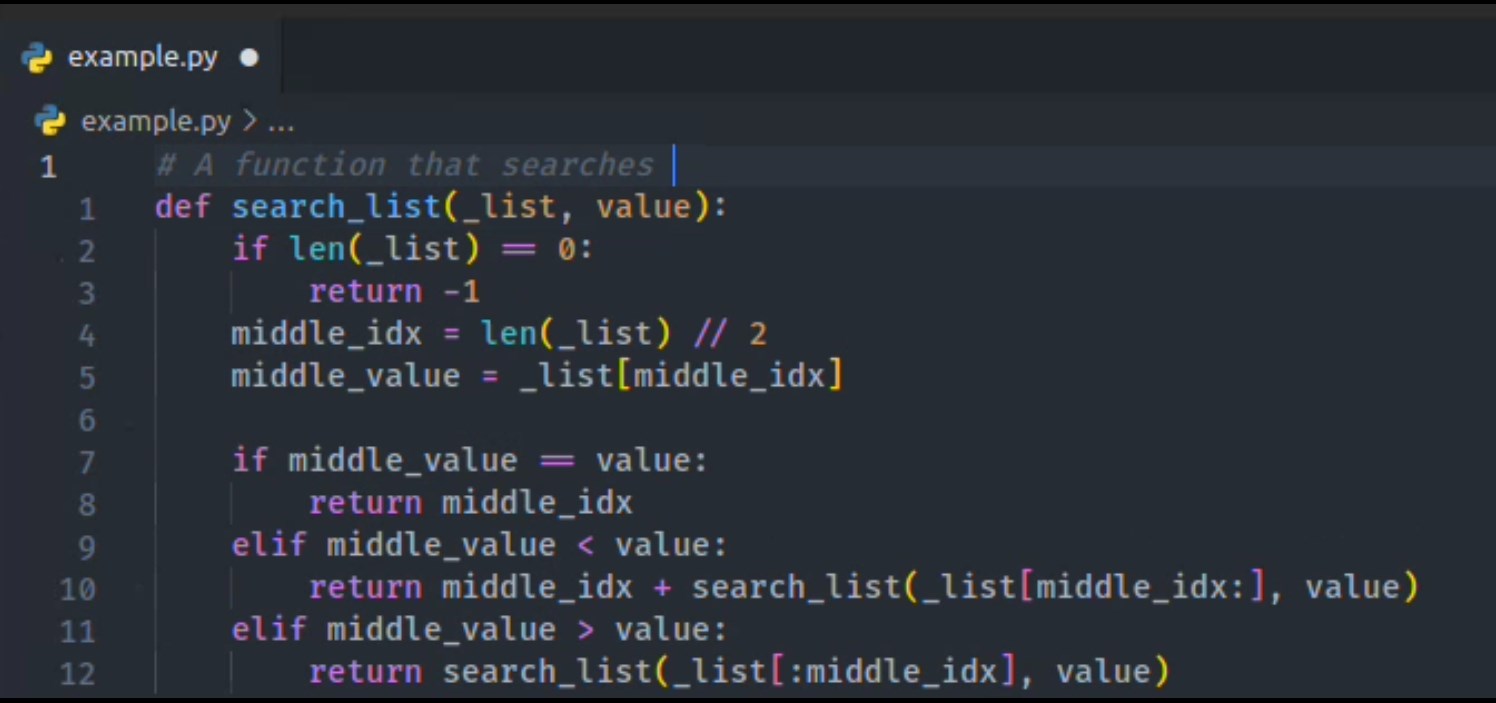
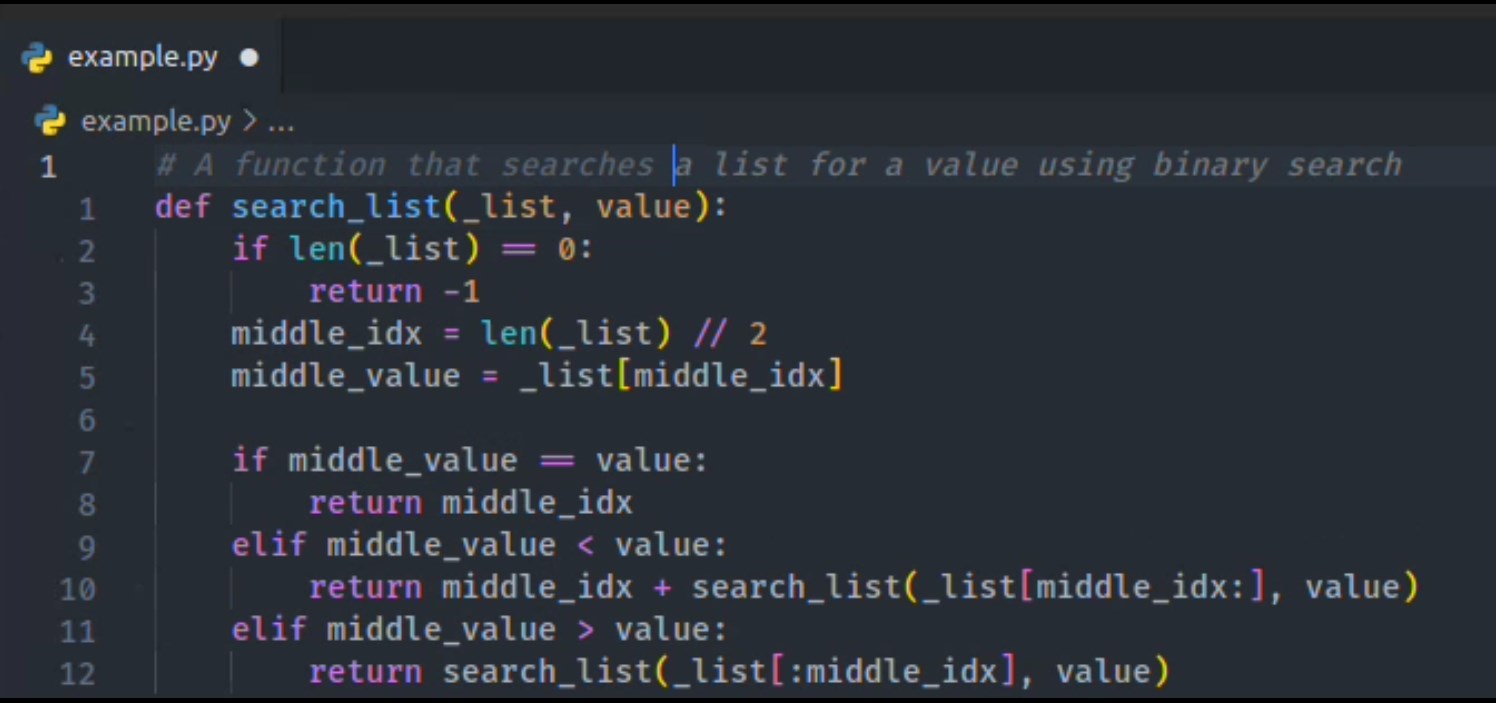
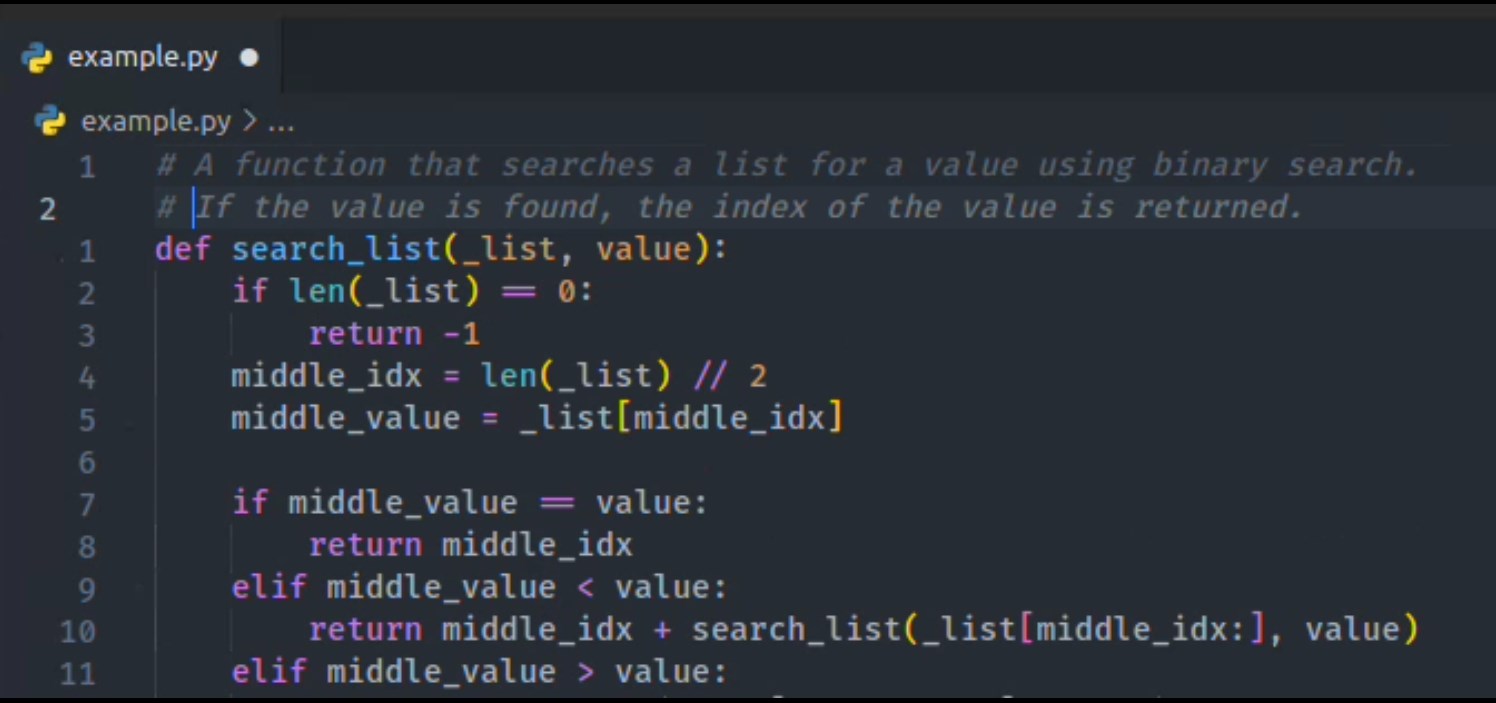
CASE 2: WRITING COMMENTS FOR YOU
This is the opposite of the previous case. Instead of manually writing comments for your code, you can let Copilot add the documentation for you.
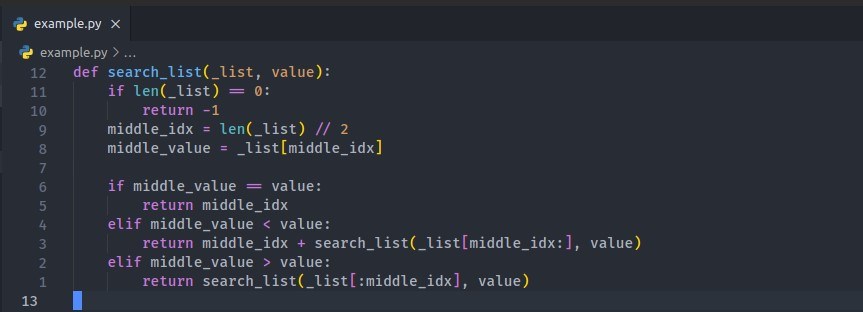
With Copilot, you can let it write code documentation for you. Just move your cursor right at the top of the function, write a prompt like “A function that searches”, and let Copilot suggest comments for you.
This is by far one of the most promising features that Copilot presents. It’s a more complex case of Case #1. When you have files opened in a new tab, it can read the contents of those files and give you more accurate and context-specific code completion. For example, say on one tab I have a file named node.py that contains a class called MyLinkedListNode.
CASE 3: HANDLING MULTIPLE FILES
This is by far one of the most promising features that Copilot presents. It’s a more complex case of Case #1. When you have files opened in a new tab, it can read the contents of those files and give you more accurate and context-specific code completion. For example, say on one tab I have a file named node.py that contains a class called MyLinkedListNode.
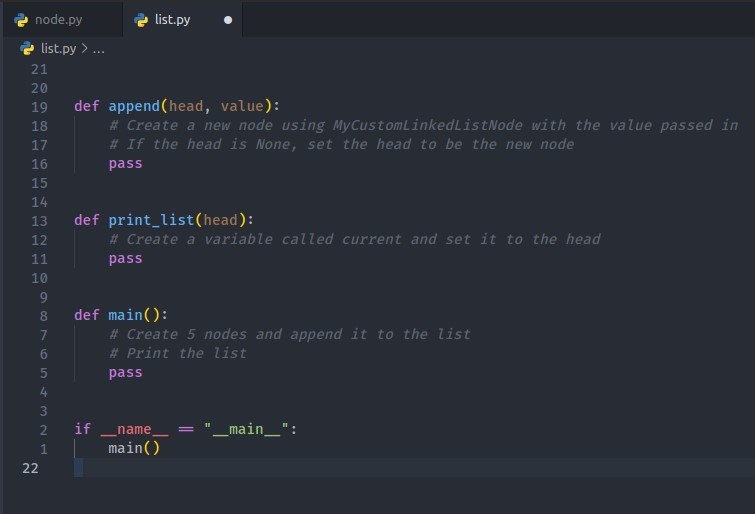
Once we import the class from node.py, Copilot can give suggestions based on the class you created.
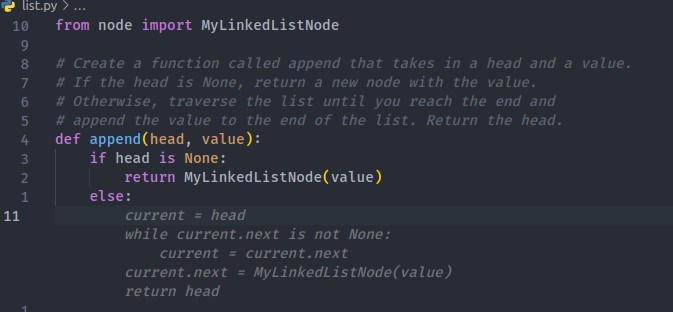
The use cases that I mentioned cover most of the tasks that a developer does (which is to write code). Copilot feels like it's a silver bullet solution, right? Wrong. Like any other tool in the world, it has its pros and cons. One thing different about Copilot (and AI-assistance tools in general) is that it raises a lot of ethical and professional dilemmas.
THE DRAWBACKS OF GITHUB COPILOT
1. COPILOT MAY GENERATE LESS OPTIMIZED RESULTS
Sometimes, Copilot may suggest a solution and write code for you im- mediately, but the result is not optimized for performance. This is a double-edged sword. I have personally witnessed the inaccuracy of Copilot’s result if the requirement requires an optimal solution. Case in point the image shown above. It generated a function that loops through a given array twice, resulting in a function with a time complexity of O(n2). A better solution could be something like this:
2. LEGAL ISSUES FACED BY COPILOT
Microsoft, GitHub, and OpenAI are all facing a copyright lawsuit. Since Copilot was trained from public repositories, one could argue that the result returned from using it can be classified as blatant plagiarism. You may know more about this lawsuit by referring to these two articles online.
3. IMPLICATIONS OF USING COPILOT IN THE ACADEME
This is a good discussion point, especially for CS students / faculty members. It’s easier now to cheat with the use of AI tools, and it's tempting for CS students to rely on Copilot to generate code for them. At the heart of every take-home code exercise / lab coding exercise is the notion that students will learn a lot from doing the work, i.e., writing and debugging code. A student can’t just use tools like GitHub Copilot and expect that its output will be good enough.
My opinion on this is that students should be transparent to their professors if they ever use AI-based tools like GitHub Copilot, and professors should have strict rules placed to guide students and steer them away from unethical actions.
CONCLUSION
GitHub Copilot (and other AI-based code-completion tools) are here and they’ll continue to evolve over the next decade. As CS students (and especially as UP students), we must always uphold honor before excellence, and using tools like these demands transparency from the students’ end. The potential of tools like these is limitless, but I believe it just makes the competition even stronger. Good software engineers will become great engineers, and bad software engineers will become worse. My last piece of advice if you want to succeed? Study the fundamentals and start writing code.
References
- Microsoft and GitHub are still trying to derail Copilot code copyright legal fight” (Thomas Claburn)
- Microsoft, GitHub, and OpenAI ask court to throw out AI copyright lawsuit” (Emma Roth)